
Pinterest SEO for Beginners: How to Get Found in Pinterest Search (2026)
Most people treat Pinterest like a social network. They post a few pins, hope something takes off, and wonder why nothing happens.
The shift that changes everything is simple: Pinterest is a search engine. People arrive with something specific in mind and type it into a search bar. Your job is to be the result they find.
That difference decides everything else. On a social feed, a post lives for a day. On a search engine, a well-built pin can bring people to your site for years. This guide walks through the foundations in the order you should actually do them — keywords first, then profile, boards, pins, and cadence.
What changed in 2026
If you learned Pinterest SEO a few years ago, one habit is now actively working against you: keyword stuffing.
Pinterest’s ranking system reads meaning, not repetition. It evaluates the whole description as language and weighs how well the surrounding sentence signals intent. A description that repeats “fall family photo outfits” five times now performs worse than one that uses the phrase once inside a sentence that answers the searcher’s question.
Three other shifts matter for beginners:
- Fresh images are prioritised. A “fresh pin” is an image Pinterest hasn’t seen before. Re-uploading the same graphic repeatedly is one of the faster ways to limit your reach.
- The image itself is read. Pinterest’s visual understanding has improved, so what’s actually in the picture contributes to how it’s classified — not just the text you attach.
- Taller pins are outperforming the old standard. More on this below, because it contradicts the advice you’ll find nearly everywhere else.
- Slow and steady beats a launch spike. A pin doesn’t need to perform in its first hour. It needs to answer a query well enough that Pinterest keeps surfacing it for months.
The aspect ratio most guides still get wrong
Almost every Pinterest guide — and Pinterest’s own published specs — will tell you to use 2:3, at 1000 × 1500px. That advice is now out of date in practice.
Across the accounts we manage, taller pins at 1:2 (for example 1000 × 2000px) or 9:16 (1080 × 1920px) are consistently outperforming 2:3 in 2026. The reason is straightforward: Pinterest’s feed is overwhelmingly mobile, and a taller pin simply occupies more of the screen as someone scrolls. More screen means more time in view, and more time in view means more chance of a save or a click.
This is a first-party observation from our own testing, not something Pinterest has published — their documentation still says 2:3, and most AI tools will repeat that back to you because they’re summarising the same documentation. We’re flagging it because the gap between the official spec and what actually performs is currently one of the easier edges available to a small account.
Practical version: build at 1000 × 2000px (1:2) as your default, or 1080 × 1920px (9:16) if you’re repurposing vertical video creative. Keep 2:3 in your back pocket — it still works, it’s just no longer the best option. Don’t go beyond 1:2 into extremely long infographic pins, which get truncated in the feed.
What this looks like when it works
Here’s a real result from a lifestyle content brand whose Pinterest we rebuilt around search intent. Organic only — no ad spend. The changes were the ones in this article: keyword research, restructured boards, rewritten pin copy, and a consistent publishing cadence.
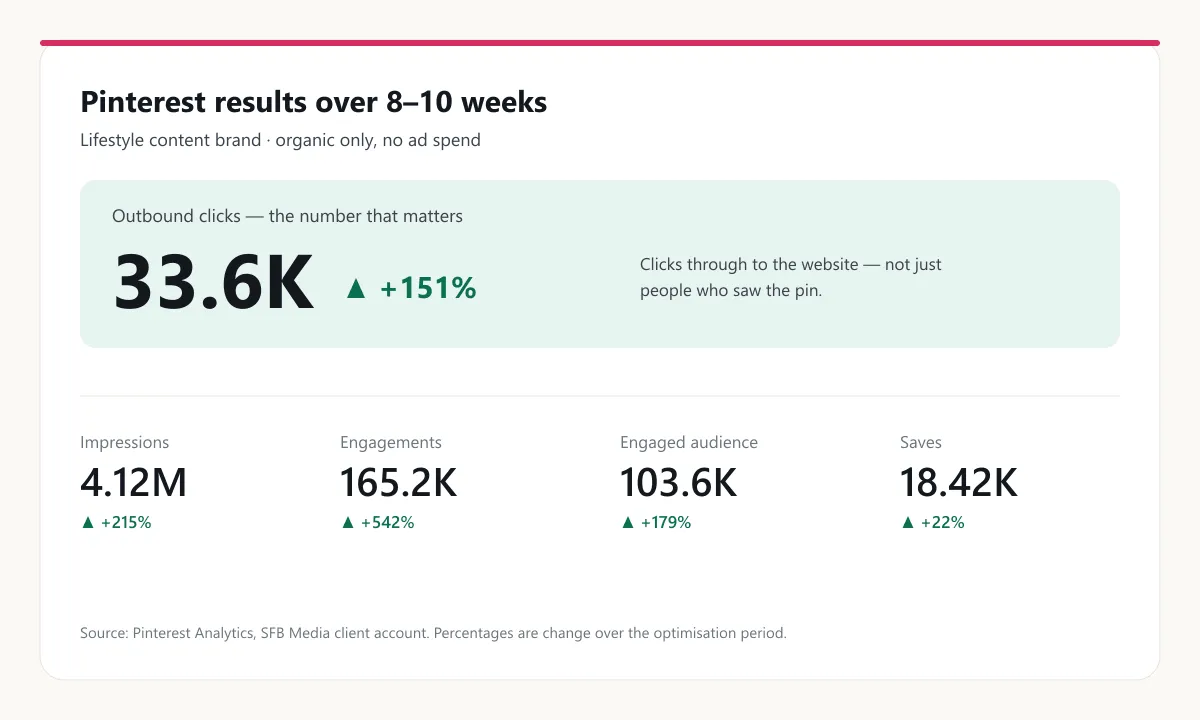
The number worth looking at is outbound clicks, not impressions. Impressions tell you Pinterest showed your pin to someone. Outbound clicks tell you the pin reached someone who actually wanted what was behind it.
Notice the gap between engagements (+542%) and saves (+22%). Saves barely moved. If the goal had been vanity metrics, that would look like a failure. It isn’t — it means the additional reach was landing on people with genuine intent to click through rather than people idly collecting images. That’s the trade you want.
One honest caveat: this was roughly 8–10 weeks of concentrated work on an account that already had good visual content. Pinterest rewards patience, but it isn’t instant, and a brand starting with no usable images has a longer road.
Step 1: Find the words people actually type
Everything downstream depends on this, so do it first. If you build pins around phrases nobody searches, nothing else you do will rescue them.
The free method. Open Pinterest, start typing a topic into the search bar, and read the auto-suggestions. Those are real queries, ordered roughly by how often people use them. Then search your term and look at the tiles that appear along the top — those are Pinterest telling you how it categorises the space.
The faster method is a keyword tool that shows actual search volume, so you’re measuring demand instead of guessing. Here’s real Pinterest volume data for this article’s own topic:
| Keyword | Monthly Pinterest searches |
|---|---|
| pinterest seo | 970 |
| pinterest seo tips | 144 |
| pinterest seo strategy | 122 |
| pinterest seo keywords | 92 |
| seo for pinterest | 12 |
Two lessons sit in that table. First, phrasing matters enormously — “seo for pinterest” gets a fraction of “pinterest seo” despite meaning the same thing. Guessing between them would cost you most of the available traffic.
Second, the head term isn’t automatically the target. A brand-new account has little chance against established players on “pinterest seo”. The specific phrases underneath it are far easier to rank for, and the people typing them know what they want.
We wrote a full walkthrough of this process in our guide to Pinterest keyword research with PinClicks.
Step 2: Fix your profile
Your profile is the first thing Pinterest reads to work out who you are and what to trust you with. It takes ten minutes.
- Name field. Add your main keyword after your brand name — “SFB Media — Pinterest Marketing” rather than just “SFB Media”. This field is indexed.
- Bio. Write it for a human, but work two or three core search terms in naturally.
- Claim your website. This links your pins back to a verified source. It matters for trust, and it unlocks the analytics you’ll need later to tell what’s working.
- Convert to a business account if you haven’t. It’s free, and without it you have no analytics at all.
Step 3: Treat boards as topic signals, not storage
This is the step beginners most often get wrong, and it’s the one with the most leverage.
Boards are not folders for tidying pins away. They’re how Pinterest works out what your account is about and how confidently to distribute your content. A board called “My Faves” tells Pinterest nothing. A board called “Fall Family Photo Outfits” tells it exactly what to do with every pin inside.
The rule: your board title is a search phrase, not a clever name. Take the keyword sets from Step 1 and make each one a board.
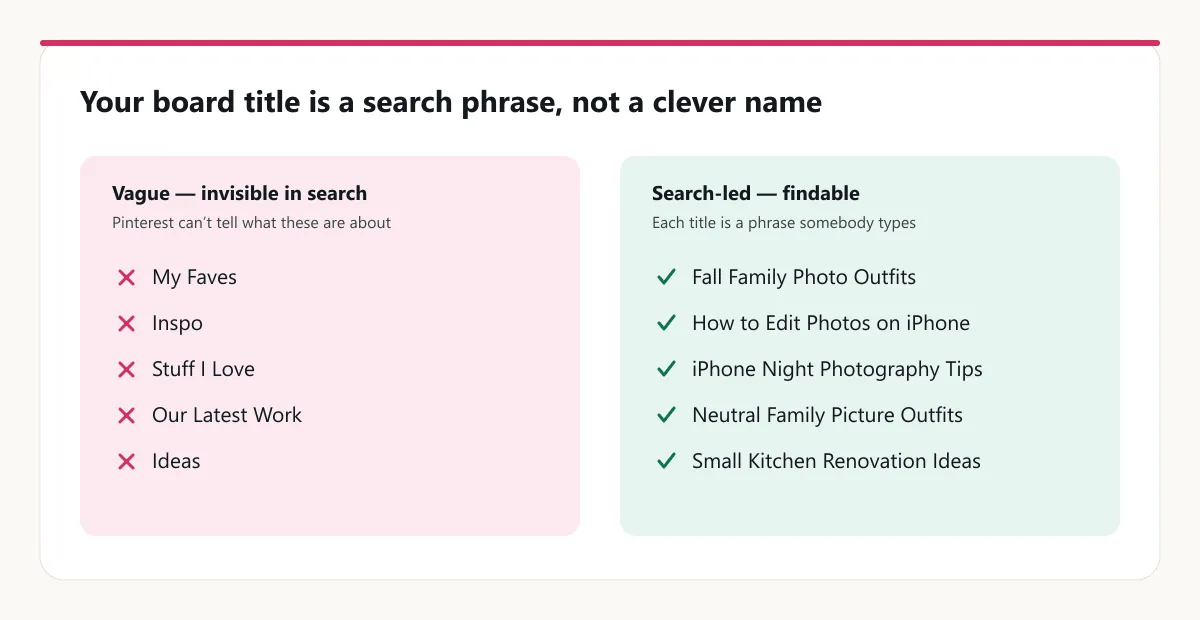
On one account we run, that principle produced boards named “Neutral Family Picture Outfits”, “How to Edit Photos on iPhone”, “iPhone Night Photography Tips” and “Earth Tone Family Picture Outfits”. None of them are creative. All of them are phrases somebody types.
Then write each board a description. You get 500 characters — use two or three sentences that naturally include the terms for that topic. Most people skip this entirely, which is exactly why doing it is worth your time.
Keep boards tight. One clear intent each, rather than one sprawling board covering half your niche.
Step 4: Write pins that get indexed and clicked
Every pin has three text fields Pinterest reads, plus an image that decides whether anyone acts.
Here are the current specs:
| Field | Limit | What’s actually visible |
|---|---|---|
| Title | 100 characters | Roughly the first 40 in feed |
| Description | 500 characters | Roughly the first 50 before the click |
| Image | 1000 × 2000px (1:2) — see the ratio note above | The whole thing — this is what stops the scroll |
Because so little text shows before someone clicks, the title has to carry the hook and the keyword together. The description is where you write for the algorithm and for the person who clicked in.
Here’s a real pin we published, so you can see the pattern rather than the theory:
Title: The Hidden iPhone Slider That Instantly Fixes Flat Photos (It’s Not Brightness)
Description: Raising brightness is the first thing everyone reaches for, and it is exactly what leaves an iPhone photo looking flat and grey. The slider that actually adds depth sits further down the same menu, and one pass with it is enough to see the difference. This is how to edit photos on iPhone using only the built-in editor — no apps, no subscriptions. Try it on your last photo →
Look at what that description does. The target phrase — “how to edit photos on iPhone” — appears once, inside a sentence that explains what the reader gets. It isn’t repeated. It isn’t jammed into a comma-separated list. That’s what “keyword in context” means in practice, and it’s what the 2026 system rewards.
It also opens with the mistake the reader is probably making, which is why someone clicks. Ranking and clicking are two different jobs, and the description has to do both.
Don’t skip alt text. Describe the image accurately and let the relevant words fall in naturally. The alt text on that pin reads: “Before and after split of the same window portrait, dull and flat above, warm and vibrant below.” It’s a genuine description first and a keyword field second.
Then make the image earn it. Build it tall — 1:2 as your default, per the ratio note above — and make sure it’s readable on a phone at thumbnail size, with one clear focal point and any text overlay short enough to take in at a glance. Around 85% of Pinterest use is on mobile, so if it doesn’t work small, it doesn’t work.
Step 5: Publish consistently, with fresh images
Cadence matters more than volume, and consistency matters more than either.
For a new account, one to five fresh pins a day is a sustainable target. More than that early on doesn’t accelerate anything — Pinterest needs time to work out what your account is about, and flooding it makes that harder, not faster.
The important word is fresh. A fresh pin means a new image, not the same graphic re-uploaded with a new title. Making several genuinely different designs for one article is good practice. Re-uploading one design ten times is the thing to avoid.
Spread pins through the day rather than posting them in a single block, and keep going. Stopping for three weeks and returning is worse than a slower pace you can actually sustain, because every restart looks like a new pattern to the system.
If it isn’t working, check these first
Most stalled accounts fail on one of five things.
- Your keywords are invented, not researched. If your titles don’t contain the words people type, you can’t appear for those searches. This is the most common cause by a distance.
- Everything goes to one board. Pinterest can’t tell what any individual pin is about, so it distributes all of them cautiously.
- You’re re-uploading the same image. Duplicate images suppress reach and, at volume, look like spam.
- You stopped and restarted. Sporadic posting resets the learning process each time.
- You’re measuring the wrong number. Impressions move first and mean least. Outbound clicks are the number that reflects whether your pins reach people who want what you offer.
There’s also a timing answer that isn’t a fix: it may simply be too early. Pinterest compounds slowly, and judging a well-built account at four weeks is like judging a garden in March.
Pinterest SEO FAQs
How long does Pinterest SEO take to work? Expect early signals — impressions rising, a few pins outperforming the rest — within four to eight weeks. Meaningful outbound-click growth usually takes two to three months of consistent publishing. The account in this article took roughly 8–10 weeks of concentrated work, starting from a base of good visual content.
How many pins should I post per day? One to five fresh pins daily is a realistic target for a new account. Consistency beats volume — three a day every day outperforms twenty in one burst and then nothing.
Do hashtags work on Pinterest? No. Pinterest deprecated hashtags as a ranking signal, and they clutter a description that would work harder as a readable sentence. Put the effort into your title and first sentence instead.
How many boards should I have? Enough to cover your keyword clusters with one clear intent each — for most small businesses that’s somewhere between 10 and 30 to start. Add boards as you add topics, rather than creating dozens upfront and leaving them empty.
Does Pinterest SEO help my Google rankings? Not directly — Pinterest links don’t pass ranking authority the way editorial links do. The benefit is traffic and the behaviour that follows it: people arriving, reading, and sometimes linking to or sharing your content from elsewhere.
Can I do Pinterest SEO without a blog? Yes, though it’s harder. Pins need somewhere useful to send people, so service pages, product pages or a lead magnet can work. But content pages give you far more keyword surface to target, which is why content brands tend to grow fastest on Pinterest.
What’s the single biggest beginner mistake? Writing board and pin titles that describe your brand instead of the search. “Our Latest Work” is invisible. “Small Kitchen Renovation Ideas” is findable.
Where to start
If you do nothing else from this guide, do Step 1 and Step 3. Research the actual phrases people type, then rebuild your boards around them. Those two changes account for most of the difference between an account that compounds and one that sits flat.
If you’d rather have someone look at your account directly, our Pinterest Growth Audit is A$99 + GST and covers your profile, boards, pin design, keyword opportunities and a prioritised 90-day plan, delivered as a recorded walkthrough. If you decide to go further, that fee comes off your first month of ongoing management.
Either way, start with the keywords. Everything else on Pinterest is built on top of them.
Want help putting this into practice?
We help businesses and online brands turn ideas like these into systems that actually run.
Book a strategy call